ABB (FIMER) UNO Solar Inverter WiFi Key
Several months back, I bought a second hand 4kW ABB UNO solar inverter, and today, I finally got around to turning it on for the first time. The solar inverter will connect in to a larger system managed through a Victron Cerbo GX, and supports monitoring over WiFi (I presume via Modbus TCP). To make that work, I’d need to configure the inverter over its WiFi interface. Unfortunately, connecting to that WiFi was not straightforward. (jump to the end for the trick)
FIMER designed these inverters to use a WiFi password key that is unique per device, rather than using a default password that is the same on all devices. I quite like this design in principle; it’s good that tampering with someone else’s power electronics is difficult, but the implementation is a bit annoying. From the factory, the inverter has a sticker attached, which is meant to be removed and stuck in to documentation that stays with the installation - the idea is that sticker has the password and so it won’t be visible on the side of the installed inverter. The problem is, that if you lose access to that information, you’re apparently up the creek. As is probably obvious, I didn’t have that sticker! (I have emailed ABB support with my inverter’s serial number to see if they can supply the password - will update this if/when I have a response)
ABB’s documentation shows the WiFi password (which hey call a Product Key or PK) as being a 16-digit hyphenated number eg 1234-5678-9012-3456. I found a YouTube video showing the PK along with the rest of someone else’s inverter label; their PK matched that format and it didn’t seem obviously related to any of the other numbers on their inverter’s label. One comment elsewhere on the Internet referenced a default password which is active for the first 24 hours, but that didn’t make sense as the WiFi AP couldn’t work for two different passwords at the same time (the default one, and the one from the label). So, I went looking at the internals to see if there’s another copy of the PK inside the inverter - fortunately, there is, but it’s not obvious:
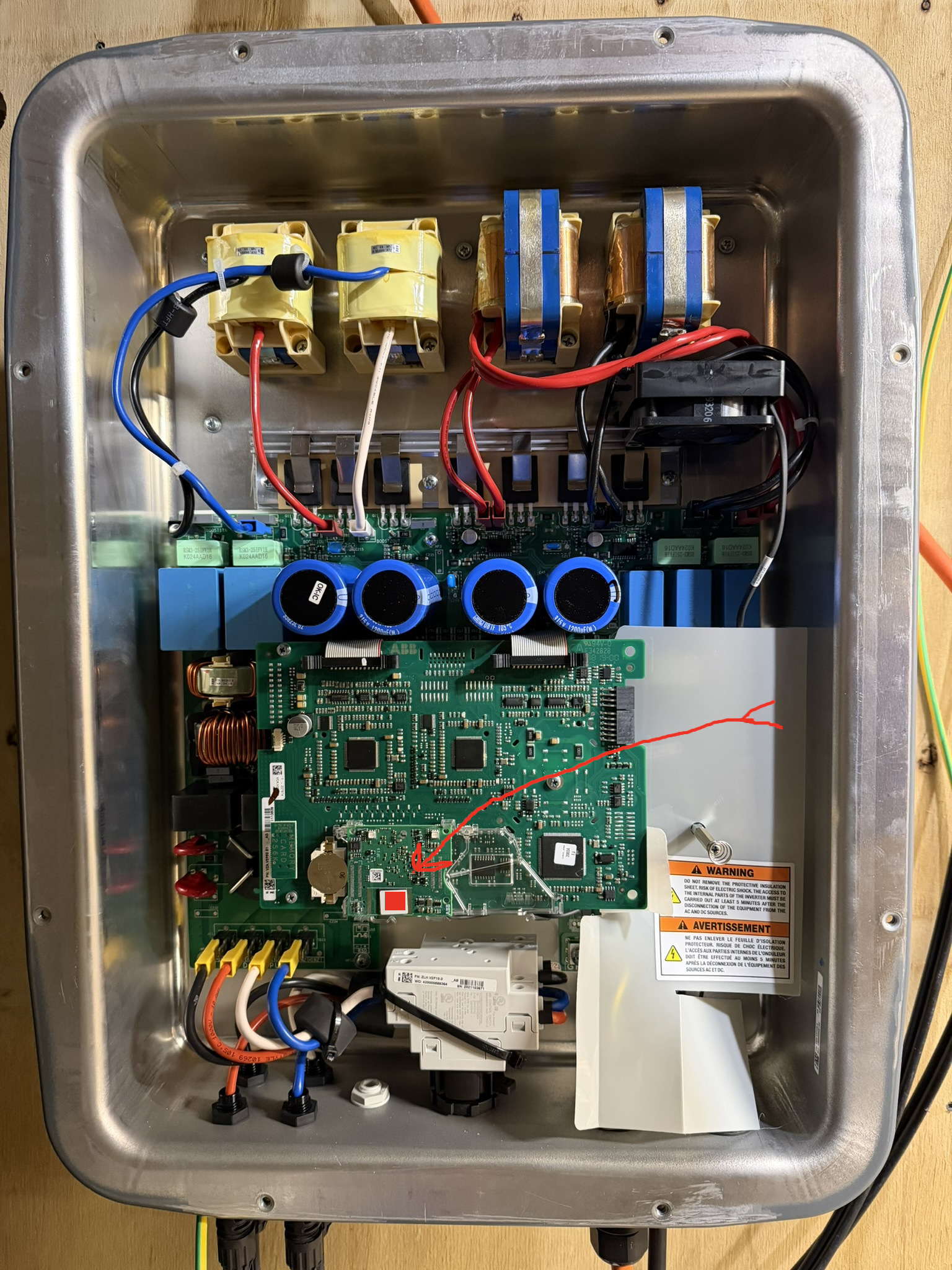
The WiFi module is a little circuit board which is easy to identify by the WiFi
antenna attaching to it via a short cable. On that module are a couple of
stickers with DataMatrix 2D
barcodes printed on them. My iPhone’s camera app handles QR codes, but not
DataMatrix; when I submitted an image of the larger code to a DataMatrix decoder
website, I was pleased to see it’s a format like VZA.V2P53.E1
20201047944311-0169-0559-1417. My WLAN Serial Number is 2020104794, which is
followed in the sticker by a number formatted exactly like what I’m looking for,
however, that didn’t work to login from my iPhone. Perhaps it was ultimately a
diversion, but I then followed the procedure to de-energise the inverter and
removed the coin cell battery for a while - thinking that perhaps the WiFi
password had been changed and this would reset it to the original PK. Still, no
luck. I went back to my laptop to do some more research, and was delighted to
find that it did work from my Linux laptop! So, something about the WiFi AP
offered by the inverter seems to not work with iOS; this was on the edge of
sunset, and it turns out the WiFi board in this inverter is powered only by the
solar panels…
- Follow user manual directions to remove the front cover of the inverter
- Identify the WiFi module
- Decode the larger DataMatrix 2D barcode on the WiFi module
- The PK is the last 19 characters of the barcode contents (XXXX-XXXX-XXXX-XXXX)